Google just put a Book Online button inside AI Mode
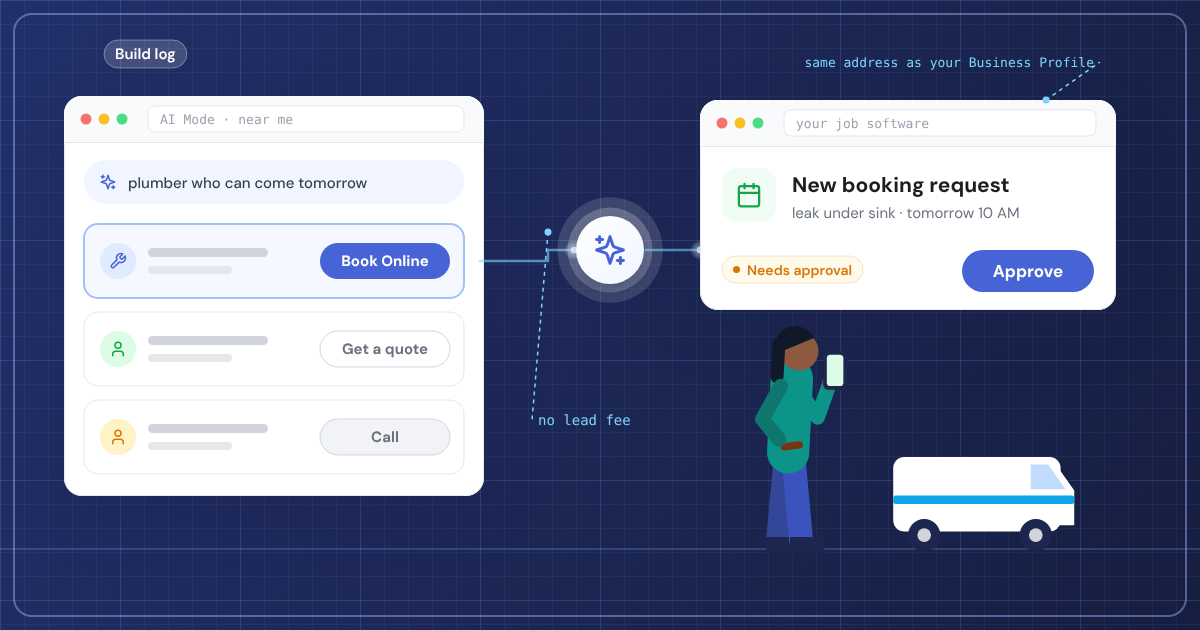
Last Wednesday, November 4, Google started showing booking and quote links for home service businesses inside AI Mode, live now in the U.S. Someone asks for a handyman who can come tomorrow, and the answer lists a few local pros with ratings, a short review summary, and a button to book them or ask for a quote. In Google's own demo, the first listing showed two open appointment times right there in the answer (Search Engine Journal).
The bookings run through four partners: Jobber and Housecall Pro on the software side, Angi and Thumbtack on the marketplace side. ServiceTitan is "coming soon."
A month ago I wrote about AI agents calling contractors for customers. That was about Google's AI picking up the phone. This is different: the booking now happens inside Google's answer, with no call at all. And AI Mode isn't a niche toy. Google said in May it passed one billion monthly users (Unite.AI).
Why a small shop should care this week
When something breaks, homeowners want it fixed fast and they'll pay for it. In Housecall Pro's survey of more than 1,100 homeowners this spring, 72% said they'd pay more to get an emergency fixed within 24 hours, and 68% said they go get more quotes when a price comes in higher than expected (Contracting Business). A button that books a time slot in one tap fits that customer perfectly.
Housecall Pro co-founder Roland Ligtenberg put it simply: "Speed wins in the trades." He also told HomePros News two things I think every owner should hear. AI agents tend to favor the providers they're more certain about and have more data on. And a fully booked contractor may not show up for a same-day request, because these requests are about time, not price (HomePros News).
Then there's the money. Jobber and Housecall Pro both say AI Mode requests carry no lead fee. Google's Local Services Ads, by comparison, charge you for booking requests as leads (Search Engine Journal). A free booking channel from Google is worth an afternoon of setup.
How to get the button
If you're on Jobber
Jobber has the clearest path right now. Here's what its help page says you need (Jobber Help Center):
- A paid U.S. subscription. Trial accounts can't show up in AI Mode.
- Turn on "Help clients find my business" in Company Settings.
- A complete business address. Pick the suggested address so it matches Google Maps.
- Connect your Google Business Profile under Marketing > More > Google Profile. It has to use the same address as Jobber.
- A request or booking form connected to Google. Jobber connects your default request form automatically.
Once Google matches your profile, a Book Online button shows up on your Business Profile and links to your Jobber form. That "usually" takes a few days. AI Mode uses the booking settings, hours and availability windows you already have. If you require approval for assessment bookings, these come in as "Needs approval," so nothing lands on your schedule until you say yes. I like that a lot. And if you're not showing up, Jobber says to check that your address, phone number and website match your Business Profile exactly.
If you're on Housecall Pro
Housecall Pro's partner page says every Pro is auto-enrolled, with nothing to turn on and no Business Profile required. Requests land in your Job Inbox, and an automatic reply goes out right away (Housecall Pro). Its press release from the same day says the integration is "coming soon to eligible US customers" (GlobeNewswire). So I'd read it as rolling out. Either way, your calendar is what customers see, so keep your open time honest.
If you're on Angi or Thumbtack
These are quote links, not bookings. Pick an Angi pro in AI Mode and you land on that pro's Angi profile to request a quote. Angi's announcement doesn't say whether its usual pro fees apply (Angi). Thumbtack was named by Google but hadn't published its own details as of launch day.
If you're on none of them
You can still show up. Contractors don't need to be customers of the booking partners to appear in AI Mode answers, and listings can show a call or website link instead (HomePros News). What you won't get is the blue button. A booking link you paste into your profile yourself shows up as a plain link (BCC Interactive). So for you, the phone and your website are still the whole game.
The button gets you a request. The follow-through gets you the job.
Frontier Air Conditioning in Mission, Texas is a good example of what happens after the request comes in. They run Housecall Pro with estimate templates, a pipeline for open estimates, text and email marketing built in, and an AI phone tool for after-hours calls. In Housecall Pro's case study, one customer approved a $39,000 installation after an automated follow-up email (Housecall Pro). That's a vendor case study, and it's from before AI Mode. But it shows the point: a lead only turns into money if something answers it, quotes it and follows up.
Investors are betting the same way. Broccoli, which builds AI agents that book appointments, follow up on estimates and fill open tech schedules for home service companies, just raised $52 million. It says its agents have booked 2.5 million appointments across more than 1,500 businesses (Contracting Business).
What's real and what's still hype
Real: the booking and quote links are live in the U.S. They're free on Jobber and Housecall Pro. They use your real hours and availability. Requests land in software you already use.
Unknown: how Google picks who shows up. Google says local results are mainly based on relevance, distance and popularity, and keeps the rest confidential (HomePros News). Nobody has published booking volumes yet. And plenty of searches will still end in a phone call or a website visit, not a button. So don't cancel anything that's working. Add this on top.
Where Solvr Labs fits
Getting matched: AI Agent Readiness
The most common reason a shop doesn't get matched is boring: the address, phone or website in the job software doesn't quite match the Business Profile. Fixing that is a core part of AI Agent Readiness. I line up your Google Business Profile, Apple Maps, Bing, Yelp and your site so they all say the same thing. I add structured data and an AI briefing file (llms.txt) so assistants describe you correctly, put your service area and price ranges in plain text, and make your booking or quote form something an agent can actually complete. It works on the site you already have. The audit and fixes are a one-time project priced by the size of your site and how many listings need cleanup, with optional monthly re-checks. I won't promise Google picks you. Nobody controls that. I can remove the reasons it would skip you.
The calls that still come in: Radar
Lots of AI Mode listings show a call link, and Ligtenberg's point about availability cuts both ways: if a customer taps call and nobody answers, they tap the next one. Radar answers in under 2 seconds, 24/7, handles multiple calls at once, and books the job straight into Jobber, Housecall Pro, ServiceTitan or Google Calendar, then texts your tech. Full AI mode starts at $149/month plus a one-time setup fee, no contracts. If you'd rather keep a person on the phone, Copilot mode runs at about half the price: your receptionist talks, Radar fills in the job and fires everything with one click.
Not on Jobber or Housecall Pro
If you run your business on Google Calendar, a spreadsheet, or something custom, you don't get the button today, and I'm not going to pretend otherwise. TaskLine isn't one of Google's booking partners either. What I can do is make sure the two paths you do have, your phone and your website, convert. That means a booking page an agent can fill out, plus workflow automation that texts every web request back right away and puts it on your calendar, so you're not losing the fast customers to the shop with the button.
What to do this week
- Look yourself up. Open AI Mode and search "[your trade] near [your city] who can come tomorrow." See who shows up and which ones have a button.
- Match your info. Address, phone and website should be identical in your job software and your Google Business Profile.
- On Jobber: turn on "Help clients find my business," connect your profile, and give it a few days.
- Keep real open time on your calendar. A fully booked calendar may not show up for same-day requests.
- Decide on approvals. If you want to vet every request, turn on booking approval first.
- Answer every call. The button is new. Plenty of customers will still just tap call.
If you want help figuring out where you stand, book the free operations assessment. It's 30 minutes, you get a written report within 48 hours, and I'll check how you show up in AI Mode while we talk. Or if you already know the phone is the leak, see how Radar works.
Sources
- Google Adds Home Service Booking & Quote Links To AI Mode, Search Engine Journal, Nov 2026
- Google adds home services booking to AI Mode, HomePros News, Nov 6, 2026
- Jobber and Google AI Mode integration, Jobber Help Center, updated Nov 4, 2026
- Jobber Connects Google AI Mode to Service Booking Workflows, Unite.AI, Nov 2026
- Housecall Pro Integrates with AI Mode in Google Search, Housecall Pro via GlobeNewswire, Nov 4, 2026
- Google AI Mode, Housecall Pro (accessed Nov 9, 2026)
- Angi Leads Home Services into AI Search with Google, Angi via Nasdaq, Nov 4, 2026
- Google Book Online Button: How To Get It, BCC Interactive, Nov 6, 2026
- Aging Homes Drive HVAC and Repair Spending in 2026, Housecall Pro Survey Finds, Contracting Business, May 14, 2026
- Frontier Air Conditioning case study, Housecall Pro, Jul 8, 2025
- Broccoli Raises $52 Million to Expand AI for Home Services, Contracting Business, Oct 29, 2026